
Blockquote
Give quoted content a clear place in the reading flow.
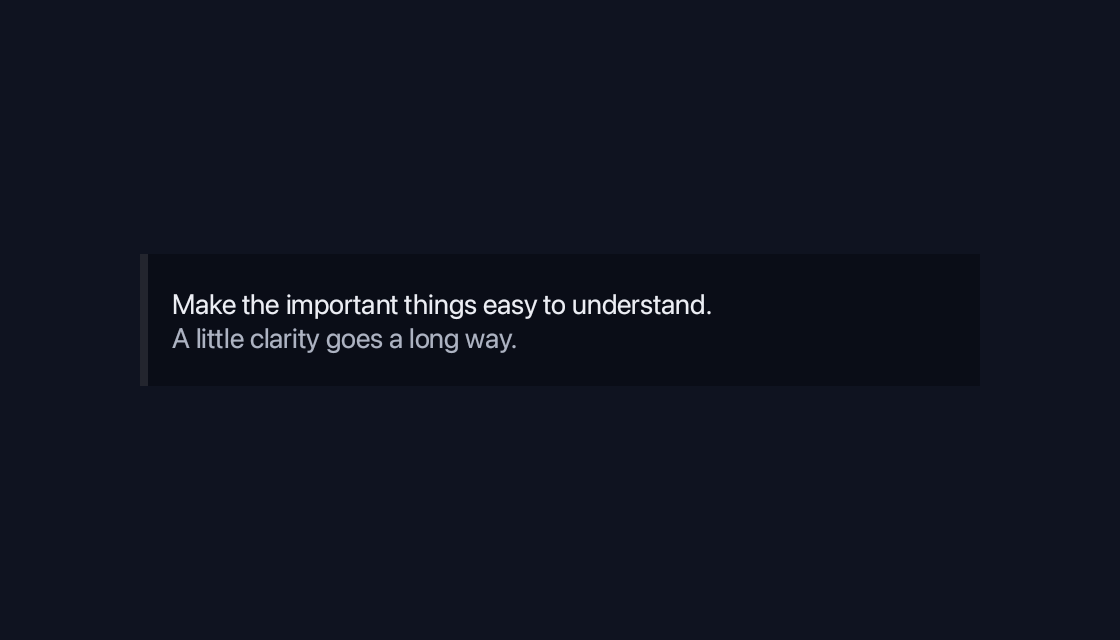
use blinc_layout::prelude::*;

pub fn blockquote_demo() -> Div {
    div().class("demo-wide").child(
        blockquote()
            .child(text("Make the important things easy to understand."))
            .child(text("A little clarity goes a long way.").class("demo-caption")),
    )
}
@layer components {
  .blinc-blockquote {
    background: var(--surface-overlay);
    border-left: 4px solid var(--border);
  }
}
Usage and properties
Give quoted content a clear place in the reading flow. This built-in widget is provided by blinc_layout; the polished action controls in the example use blinc_cn.
Use the installation guide to create a Blinc application. This widget is available from blinc_layout; the demo uses the same Hybrid theme as the component library. Create the fixture bindings once, and return the demo from your UI builder. Values marked Bound accept Signal/Computed sources where the API supports them; structural options configure the component at construction.
| Property | Type | Update model | This example |
|---|---|---|---|
child | ElementBuilder | Construction | Quotation and attribution |
Keyboard and interaction
Informational content; no activation or Tab stop is required.
Customizing it
Add application CSS after the default component layer. These selectors are the restyling surface for this component:
.blinc-blockquote
Theme and component variables: --primary, --text-primary, --text-secondary, --surface, --border, --radius-default, --duration-fast, --ease-state.
Built-in themes
The Live theme control installs Blinc's own theme bundles, including their colours, focus rings, corner shapes and motion tokens.
pub fn theme_bundle_for(name: &str) -> blinc_theme::ThemeBundle {
    match name {
        "restrained" => blinc_theme::RestrainedTheme::bundle(),
        "expressive" => blinc_theme::ExpressiveTheme::bundle(),
        _ => blinc_theme::HybridTheme::bundle(),
    }
    .with_css(blinc_cn::cn_styles::CN_STYLES)
}
Download the default widget and component stylesheets. Sample assets and licenses are available in the asset guide.
Documentation
From the canonical component guide.
markdown(r#"
> This is a blockquote.
> It can span multiple lines.
>
> And have multiple paragraphs.
"#)
Platforms and version
The component API is available in Blinc 0.6.0. The Live example runs in a dedicated worker and requires a compatible GPU surface. Preview and Code remain available when Live cannot start. The canvas has a descriptive label; a full screen-reader DOM mirror is not provided. The gallery integration is based on revision e2e55c24e078.
Recordings and live demos use the default Hybrid theme with bundled Noto Sans. The recording uses a 560 × 320 logical viewport at twice that resolution. Live follows its container and actual display density. Source base revision · Exact build source · Artifact versions and checksums · Font license.