
Markdown
Render formatted content directly in the native layout.
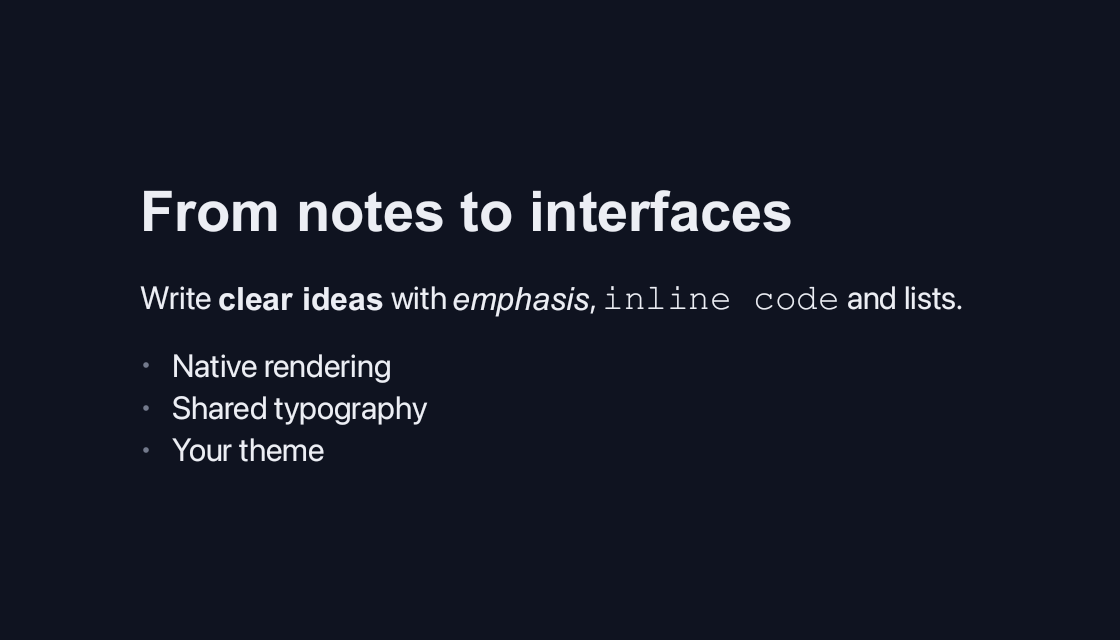
use blinc_layout::prelude::*;

pub fn markdown_demo() -> Div {
    div () . class ("demo-wide") . child (markdown ("## From notes to interfaces\n\nWrite **clear ideas** with *emphasis*, `inline code` and lists.\n\n- Native rendering\n- Shared typography\n- Your theme"))
}
@layer components {
  .blinc-blockquote {
    background: var(--surface-overlay);
    border-left: 4px solid var(--border);
  }

  .blinc-list-marker {
    color: var(--text-tertiary);
  }
}
Usage and properties
Render formatted content directly in the native layout. This built-in widget is provided by blinc_layout; the polished action controls in the example use blinc_cn.
Use the installation guide to create a Blinc application. This widget is available from blinc_layout; the demo uses the same Hybrid theme as the component library. Create the fixture bindings once, and return the demo from your UI builder. Values marked Bound accept Signal/Computed sources where the API supports them; structural options configure the component at construction.
| Property | Type | Update model | This example |
|---|---|---|---|
source | string | Construction | Headings, emphasis, inline code and a list |
Keyboard and interaction
Informational content; no activation or Tab stop is required.
Customizing it
Add application CSS after the default component layer. These selectors are the restyling surface for this component:
.demo--markdown.blinc-list-marker.blinc-blockquote
Theme and component variables: --primary, --text-primary, --text-secondary, --surface, --border, --radius-default, --duration-fast, --ease-state.
Built-in themes
The Live theme control installs Blinc's own theme bundles, including their colours, focus rings, corner shapes and motion tokens.
pub fn theme_bundle_for(name: &str) -> blinc_theme::ThemeBundle {
    match name {
        "restrained" => blinc_theme::RestrainedTheme::bundle(),
        "expressive" => blinc_theme::ExpressiveTheme::bundle(),
        _ => blinc_theme::HybridTheme::bundle(),
    }
    .with_css(blinc_cn::cn_styles::CN_STYLES)
}
Download the default widget and component stylesheets. Sample assets and licenses are available in the asset guide.
Documentation
From the canonical component guide.
Blinc includes a built-in markdown renderer that converts CommonMark + GFM markdown to native layout elements.
Basic Usage
use blinc::layout::markdown::markdown;

// Render markdown to a Div
let content = markdown(r#"
# Hello World

This is **bold** and *italic* text.

- List item 1
- List item 2
"#);

// Use in your layout
div()
    .flex_col()
    .child(content)
Themes
The renderer supports light and dark themes:
use blinc::layout::markdown::{markdown, markdown_light, markdown_with_config, MarkdownConfig};

// Dark theme (default) - for dark backgrounds
let dark_content = markdown("# Dark Theme");

// Light theme - for white/light backgrounds
let light_content = markdown_light("# Light Theme");

// Custom configuration
let custom = markdown_with_config("# Custom", MarkdownConfig {
    h1_size: 36.0,
    body_size: 16.0,
    ..MarkdownConfig::default()
});
Supported Elements
Text Formatting
| Markdown | Result |
|---|---|
**bold** | bold text |
*italic* | italic text |
~~strikethrough~~ | |
`inline code` | inline code |
[link](url) | clickable link |
markdown(r#"
This is **bold**, *italic*, and ~~strikethrough~~ text.

Here's some `inline code` and a [link](https://example.com).
"#)
Headings
markdown(r#"
# Heading 1
## Heading 2
### Heading 3
#### Heading 4
##### Heading 5
###### Heading 6
"#)
Lists
Unordered lists:
markdown(r#"
- First item
- Second item
  - Nested item
  - Another nested
- Third item
"#)
Ordered lists:
markdown(r#"
1. First step
2. Second step
3. Third step
"#)
Task lists (GFM extension):
markdown(r#"
- [x] Completed task
- [ ] Pending task
- [x] Another done
"#)
Code Blocks
Fenced code blocks with optional language:
markdown(r#"
```rust
fn main() {
    println!("Hello, Blinc!");
}
```
"#)
Supported languages for syntax highlighting include Rust, Python, JavaScript, TypeScript, and more.
Blockquotes
markdown(r#"
> This is a blockquote.
> It can span multiple lines.
>
> And have multiple paragraphs.
"#)
Tables (GFM)
markdown(r#"
| Header 1 | Header 2 | Header 3 |
|----------|----------|----------|
| Cell 1   | Cell 2   | Cell 3   |
| Cell 4   | Cell 5   | Cell 6   |
"#)
Horizontal Rules
markdown(r#"
Content above

---

Content below
"#)
Images
markdown(r#"


"#)
Configuration
Customize the renderer with MarkdownConfig:
use blinc::layout::markdown::{markdown_with_config, MarkdownConfig};
use blinc::core::Color;

let config = MarkdownConfig {
    // Typography sizes
    h1_size: 32.0,
    h2_size: 28.0,
    h3_size: 24.0,
    h4_size: 20.0,
    h5_size: 18.0,
    h6_size: 16.0,
    body_size: 16.0,
    code_size: 14.0,

    // Colors
    text_color: Color::WHITE,
    heading_color: Color::WHITE,
    link_color: Color::rgba(0.4, 0.6, 1.0, 1.0),
    code_bg: Color::rgba(0.1, 0.1, 0.12, 1.0),
    code_text: Color::rgba(0.9, 0.6, 0.3, 1.0),

    // Spacing
    paragraph_spacing: 16.0,
    heading_margin_top: 24.0,
    heading_margin_bottom: 12.0,

    // Lists
    list_indent: 24.0,
    list_item_spacing: 4.0,

    ..Default::default()
};

let content = markdown_with_config("# Custom Styled", config);
Preset Themes
// Dark theme (default) - white text on dark backgrounds
let dark = MarkdownConfig::default();

// Light theme - dark text on light backgrounds
let light = MarkdownConfig::light();
Live Editor Example
A full markdown editor with live preview is available in the examples:
cargo run -p blinc_app_examples --example markdown_demo --features windowed
This demonstrates:
- TextArea for markdown source editing
- Live preview with
markdown_light() - Stateful reactive updates on text change
HTML Entities
The renderer automatically decodes HTML entities in text:
markdown(r#"
© 2025 — All rights reserved

Temperature: 72°F

Price: €99.99
"#)
Common entities: & (&), < (<), > (>), " ("), (non-breaking space), © (©), ™ (™), and many more.
Best Practices
-
Use
markdown_light()for light backgrounds - The default theme assumes dark backgrounds. -
Wrap in scroll for long content - Markdown can produce tall content:
scroll() .h(600.0) .direction(ScrollDirection::Vertical) .child(markdown(long_content)) -
Set container width - Markdown content respects parent width:
div() .w(800.0) .child(markdown(content)) -
Code blocks need height - For syntax highlighting to render properly, ensure the container has adequate height.
-
Images need explicit dimensions - While images will render, they work best when the markdown container has width constraints.
Platforms and version
The component API is available in Blinc 0.6.0. The Live example runs in a dedicated worker and requires a compatible GPU surface. Preview and Code remain available when Live cannot start. The canvas has a descriptive label; a full screen-reader DOM mirror is not provided. The gallery integration is based on revision e2e55c24e078.
Recordings and live demos use the default Hybrid theme with bundled Noto Sans. The recording uses a 560 × 320 logical viewport at twice that resolution. Live follows its container and actual display density. Source base revision · Exact build source · Artifact versions and checksums · Font license.